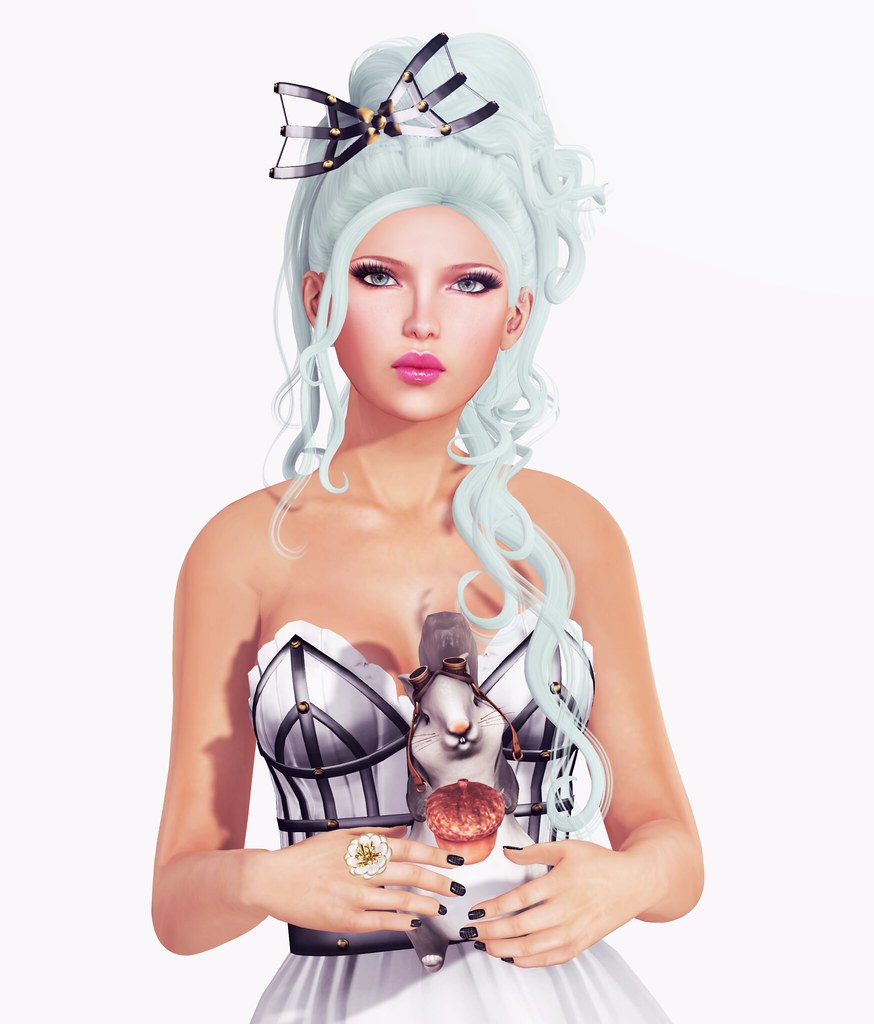
Meet my new pet everybody! The Steampunk Squirrel Companion from Ohmai is adorable!!! I looooove this lil’ guy, and his adorable aviator. There’s also a human sized pair for your avatar! YAY. I will wear mine everywhere.
This Pastel Teal hair color from Exile is stunning! The entire Pastels texture collection is really gorgeous, reminds me of frozen yogurt. I am wearing the Dream of Paradise hairstyle, it’s so regal and perfect. This amazing new Metal Corset Dress from Katat0nik is a departure from her usual Kawaii-inspired style, but I love it! This is so beautifully done and unique! I also love the matching Metal Bow!!
What I’m Wearing:
Pink Fuel Skin
Exile – Dream of Paradise
Katat0nik – Metal Corset Dress
Katat0nik – Metal Bow
Ingenue – Odette Heels
Donna Flora – Camelia Ring
Ohmai – Steampunk Albino Squirrel / Sit Animated
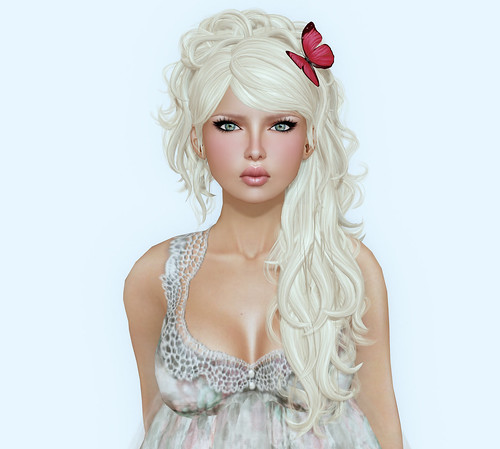
After years of seeing all the cool Pile-Up pictures on Flickr and being too shy to submit my own, I finally did it! The result was awesome, thank you so much to everyone who did one.
This is the Pile-Up picture that I submitted, since it’s my first time I wasn’t sure if I should do it on a White background or Green screen. Some people said they preferred White, others preferred Green, but apparently with my Blonde hair color, Green screen might have been a better choice? Maybe next time!
It’s not too late to Pile me up, if you still want to — click this link download the original file size.
Here are links to three of the Pile-Up Groups on Flickr that I joined:
If you want to submit your own, read the rules for each group and get started. It’s FUN!!
Credits: Images used for the magazine covers are pile-ups that other people have done with my picture. I used a website called MagMyPic to create the covers.
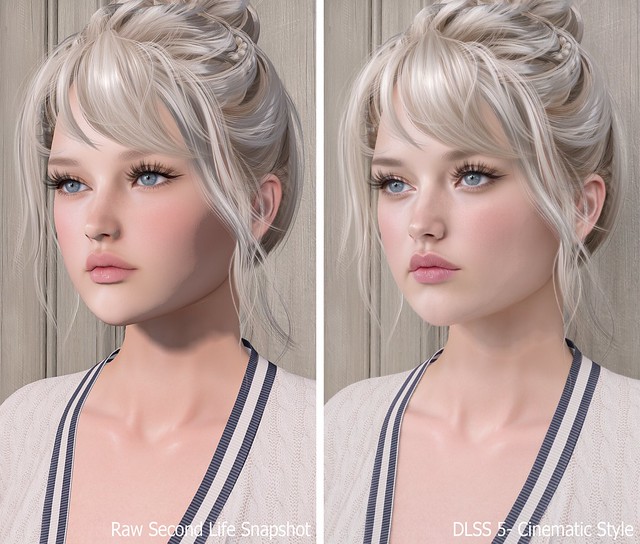
Previously, I shared my first DLSS 5 photo and promised I’d return with the full process, comparison photos, and everything I learned while getting it working in Second Life. What I expected to be a quick installation turned into a much deeper dive, but after plenty of reinstalling, troubleshooting, and comparing files, I finally found a setup that works for me.
DLSS stands for Deep Learning Super Sampling, an NVIDIA technology that uses AI to improve graphics. DLSS 5 goes beyond simply sharpening or upscaling the image by enhancing lighting, textures, materials, shadows, and small details in real time. The result still looks unmistakably like Second Life to me, only more polished and realistic.
The process may seem confusing at first, but once you have the correct files, installing it on another viewer should take about five minutes.
TL;DR: The Short Version
If you don’t want to read this entire post, here’s the condensed version:
Add Firestorm-Releasex64.exe, or the executable for your preferred viewer, and select OpenGL, ReShade (default) and DLSS5-Feeder (No DLSS / Incompatible DLSS).
Let DLSS 5 Swapper install the required files.
Replace the renodx-dlss5.addon64 with the older file posted by Krish as v4.55 in the official RenoDX Discord. It appears as approximately 1.61 MB in Windows or 1.62 MB in Discord.
Launch Firestorm and check ReShade’s Add-ons tab for DLSS 5 Feed 0.15.1 and DLSS 5 Neural Rendering.
Press F6 to turn neural rendering on or off.
If the optional Swapper controls say NOT CONNECTED, DLSS 5 may still be working.
The Videos That Helped Me Find the Answer
FlutterWonder’s DLSS 5 video led me to the solution. I reached out in Second Life and learned that the older renodx-dlss5.addon64 file was the missing piece. Thank you, Flutter!
I also found Athena Felicci’s DLSS 5 video. Athena has a Discord with instructions for another method. I haven’t tried it, but it appears to work for other residents.
How to Install DLSS 5 in Second Life
Step 1: Make a Separate Firestorm Installation
Copy your Firestorm folder and give the copy a different name. This lets you install ReShade, replace files and troubleshoot without risking your main viewer. Once everything works, keep a backup of the entire folder because newer experimental files may not work as well with Second Life.
Step 2: Add Firestorm to DLSS 5 Swapper
Open DLSS 5 Swapper, add a new game or installation, and select Firestorm-Releasex64.exe from the copied Firestorm folder. Be sure you modify and launch the same installation.
Use these settings:
Rendering API: OpenGL
Rendering backend: ReShade (default)
Installation route: DLSS5-Feeder (No DLSS / Incompatible DLSS)
Let the installation finish, then check the Firestorm folder for reshade-shaders and the required .addon64 files.
Step 3: Replace the RenoDX File With the Working Version
Join the official RenoDX Discord, open the #dlss5 channel, and check the Pinned Messages for the renodx-dlss5.addon64 file posted by Krish as v4.55. Discord displays the file as approximately 1.62 MB, while Windows displays it as approximately 1.61 MB.
Close Firestorm, open its installation folder, and overwrite the existing renodx-dlss5.addon64 with the older working version.
Step 4: Launch Firestorm and Check the ReShade Add-ons
Launch the Firestorm installation you modified, open ReShade with the Home key, and select Add-ons. My installation shows:
DLSS 5 Feed 0.15.1
DLSS 5 Swapper Overlay
DLSS 5 Neural Rendering
DLSS 5 Feed and DLSS 5 Neural Rendering are the important ones. DLSS 5 Swapper Overlay is optional, so its absence doesn’t mean the installation failed.
My ReShade Tips
The default ReShade controls can be annoying in Second Life, so these small changes make the setup much easier to use.
Change the ReShade overlay shortcut under Settings if you don’t want to use Home. I use the ~ key.
Set Settings > General > Input Processing to Pass on all input so you can control Second Life while ReShade is open.
Drag the top of the ReShade panel to move it anywhere on the screen.
Press F6 to toggle DLSS 5 neural rendering on or off.
Important Notes Before You Try This
This is an unofficial and experimental method.
Use DLSS 5 in short bursts for photos or testing instead of leaving it running all day. My viewer eventually felt slower, and my graphics driver crashed.
I tested this on Windows with an NVIDIA GeForce RTX 3090 Ti, not on a Mac.
Other graphics cards, drivers and viewers may produce different results.
Back up your viewer folder and working RenoDX file.
Download executable add-ons carefully and only from sources you trust.
If you try it, let me know which viewer and graphics card you used and whether the older RenoDX file worked for you. This setup is changing quickly, so something that works today may behave differently after a future update.
Need Help with Installing DLSS 5 to Second Life Viewer?
Join the Second Life Cafe Discord, dlss5 channel if you need more help: https://discord.gg/cdKVGHmYjq. I will answer all of your questions there!
Sweetest Goodbye has a small collection of beautifully textured clothing with yummy sculpted prims in all the right places. I’m always on the quest for short skirts but designers keep releasing knee-length or longer.. *sobs* Until I found Sweetest Goodbye this morning, even though there was only ONE short skirt, it was the perfect little flexi-sculpted skirt that comes in several different muted tones.
I’m wearing.. the Sweetest Goodbye – Happy Mania White shirt paired with a red sculpted ribbon; and the Sweetest Goodbye – Delispice Choco skirt (with belt). The Delispice skirt comes with two options, with and without belt.
[ – FREEBIE ALERT – ]
This yummilicious sculpted bag is available for FREE @ Sweetest Goodbye. I like that the bag is modifiable, so I’ve textured the cube with my own picture 🙂 You can go a step further and texture each individual face on the cube with pics of your bf, pets, home, self, etc.
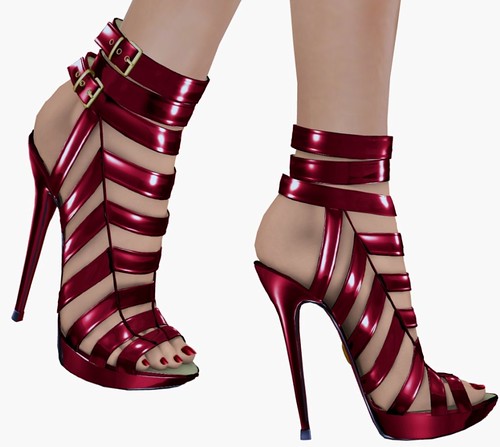
Stiletto Moody gave group members a free pair of Stiletto Moody Bare Lana in Red to celebrate the brand’s anniversary. For various reasons, I haven’t ever bought a pair of SM shoes (with or without feet). I am usually pretty good with tinting feet — and I own a lot of shoes from different brands in SL with them. I don’t understand why a pair of shoes that costs well over $2,000L does not include a HUD but a rather primitive drop-down menu. Really SM, you can’t make a HUD? It would make the tinting process SO much more pleasant. Other brands have them… Maitreya, SLink, even N-Core!
Anyways.. these shoes are FREE, so you know, like everybody else I’m curious to see what all the fuss is about.
All the photos taken below have NOT been post-processed — this is what a pair of Stiletto Moody Bare looks like to me:
1. Straight out of the box — my skin doesn’t match and the ankle strap doesn’t fit into the shoe.
2. I tried fixing my skin color via the ‘ControlFreak’ option and inputting my RGB — uh-oh my feet are PURPLE. So obviously I’ll have do it using the R,G,B drop-down menu which I hate. How am I suppose to know if I need to plus or minus more Green, Red or Blue? I’m a visual person, give me a HUD!
3. 10 minutes later, I’ve matched my skin as best as I could and fixed the fitting issue on the ankle strap.
4. Worn with my AO
Now that I’m satisfied with this, I hop off my pose stand and test the shoes out in-world with my AO. And it looks like crap….. hello hot mess. Looks good if you are posing but not so great when you want to wear it in-world.
5. Is this what you paid $2,000L for? (or however much these costs, I don’t know the exact price)
Would I buy a pair of Stiletto Moody? NO — not with the ankle strap issue. The foot isn’t that nice either with all those heavy shadows but it’s probably something I could live with.. but not for the price tag or the ill-fitted prims.
I know there are die-hard Moody fans out there, so enjoy your shoes! 🙂
I'm wearing the poofy Twizzy hair from House of Munster. I love the hair because you can touch to change the texture and size, but still be able to mod each individual strands via the regular edit menu.
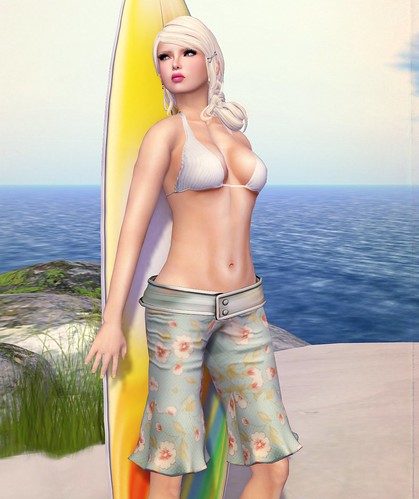
LeeZu released these amazing new Yve Pants that has a sculpted belt, and sculpted leg prims. I think these pants are nearly perfect, the leg prims & pants meets seamlessly, and they end right before the knee joint so it’s perfect for AOs & works with many different poses! I had to lower my hips saddle, and butt size just a tad to have a better fit, cos I wanted the belt to be snug around my avatar.
Although these are not board shorts, I paired it with a cute little bikini top from BOOM and and wore it to the beach! These are so many ways to style these pants, as they come in a variety of prints & solid colors.
What I’m Wearing:
Truth – Bethany (Swedish)
BOOM – Infinity Pin Stripe Bikini (White)
LeeZu – Yve Pants (Vintage Blue)
Elate – Theia Sandals (Ivory)
&
What Next – Surf’s Up Pose Set (Surfboard)









Cutest outfit ever 😮
Love this dress, so sexy and the hair goes beautifully with it!