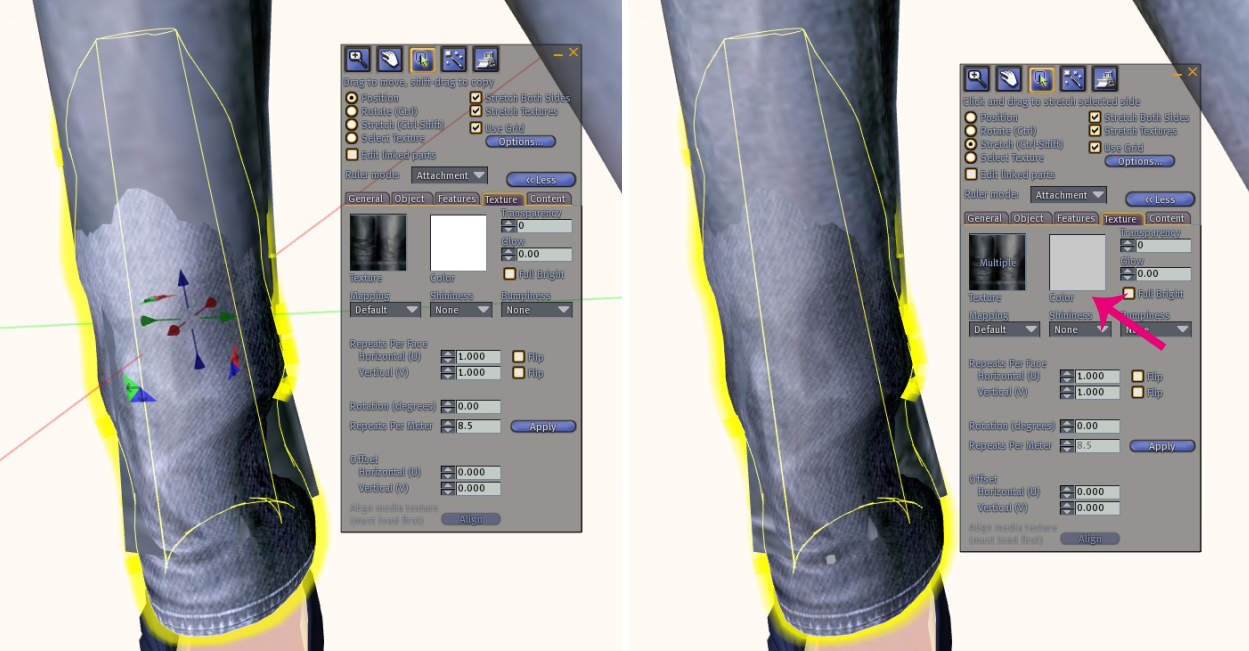
Hi all, I have a quick tutorial today about tinting attachments. When people wear attachments and don’t tint them to match their clothes, it can ruin the entire look. Adding a gray tint will help fix this problem, while you may not get a perfect match, it will match better than before.
But Gogo, how much gray do I need to make the attachment? There is no set value, it all depends on what you’re tinting so do it slowly and start looking more fabulous! 🙂
When designers make items no mod, you’re pretty much out of luck. I’m not a fan of wearing prims that are set to "Full Bright" so when I can’t undo that or color-match it DRIVES ME CRAZY!
Gala Phoenix will be releasing the April skins soon (tonight or tomorrow) and they are fantastic!! There are seven makeups for each skin tone, and two versions of each makeup included in every purchase. If you've ever wanted MORE COLORS… here they are, tons of bright & bold eyeshadow with names that are happy, like Bunny, Rainbow, Showers, Tulip, etc.
[ GP – Petal [Dark] April-Bunny 1 | 2 ] [ GP – Petal [Dark] April-Crocus1 | 2 ]
[ GP – Petal [Dark] April-Jonquil 1 | 2 ] [ GP – Petal [Dark] April-Pure 1 | 2 ]
[ GP – Petal [Dark] April-Rainbow 1 | 2 ] [ GP – Petal [Dark] April-Showers 1 | 2 ]
[ GP – Petal [Dark] April-Tulip 1 | 2 ]
April has new lips, brows, and nose (from what I can tell, there may be more subtle differences all over the body). The new brows are super nice and the lips are a bit pouter, too.
So many new things have been released in the past couple of days, unfortunately, I’m not wearing any of them. I couldn’t decide if I should review some new mesh jeans, or some mesh eyelids (omg, what?), or a couple of the newly released skins! I opted to just wear some favorite items from my inventory instead.
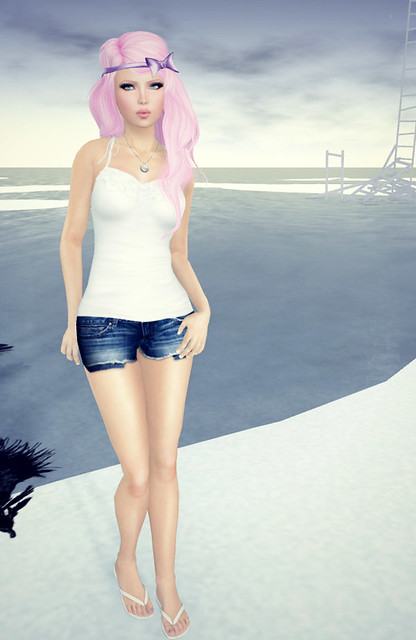
SL wouldn’t let me save snapshots today, so I had to use [print screen] for these two images, but I think they turned out surprisingly well! Some day I’ll be able to take higher resolution pics!
What I’m Wearing:
Exile – Midnight in Paris (BabyDoll)
Zaara – Mishti Tank (Ivory)
Cracked Mirror – Daisy Cutoffs (Blues)
Maitreya Gold – Flip-Flops
Mon Tissu – Oui Necklace (Silver)
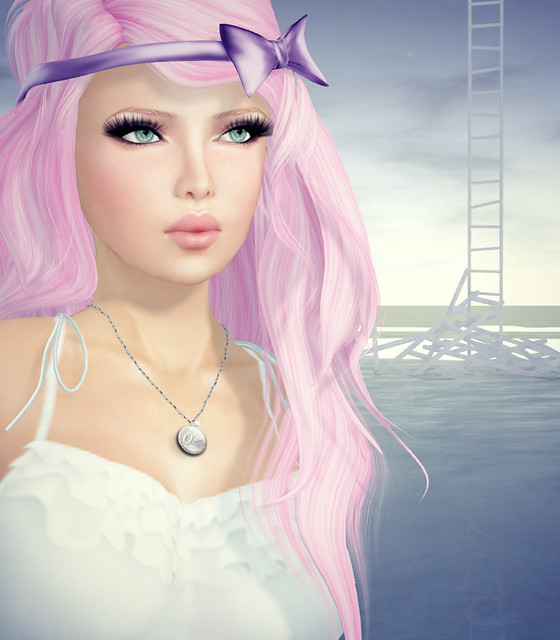
I love this new Laqroki Molly skins! This skin is available in 3 skin tones (I’m wearing Fair here) and each skin tone has 10 makeups. Each makeup comes with 2 different brows version – light and dark. I love that I can wear Blonde hair with this face, since the brows are light enough & thinner than usual.
The Laqroki body is amazing, as always!
I’m wearing this adorable Licio hair from Fascino. I’ve even added a hair bow to the style to make it very Gaga-like. Now, my gripe with Fascino is that they’re incredibly hard to resize and when you resize the hair, the textures are a lil messed up. If you look closely at the hair near my ears, you will see that the textures on the flexi hair strands are a little off, and it drives me crazy! Still, this is the best Gaga-inspired hair on the grid. I have hair from other brands with a hair bow and I don’t like them as much.
You know when you’re looking at an AI-edited Second Life photo, right? You have eyes. You know that hair doesn’t really look like that, the surroundings are way too realistic, or something is just slightly off. Not quite Second Life. It’s above what Second Life is capable of. I think Second Life looks amazing now, but I rezzed during the system Ruth avatar era. I remember what we used to look like.
Many Second Life brands are now marketing to us, the residents, with flawless AI-edited photos, but they’re not being honest about it. They want you to think they’re just amazing at photography/editing and that you too can achieve that look if you buy their products. AI editing is basically the same thing as 3D rendered ads at this point. It’s just too good to be raw Second Life.
I have an amazing computer, and it frustrates me sometimes when I can’t render images that look that good. But I’m not against AI editing at all, since I can’t be deceived, but maybe someone new to SL may be. What amuses me is that whenever a resident posts an AI-edited photo for fun, fellow residents attack them, but when brands do it, nobody says anything. I was telling my friend that residents go after each other, and especially bloggers, because attacking us has no consequences. They don’t dare confront their favorite brands for fear of the brand’s fans attacking them back, or the brands themselves responding.
All of this to say, I was happily surprised when I was scrolling X (Twitter) and came across this prompt post by Sopha Portal, the designer of MudSkin. She also posted the raw image from Second Life so you could compare what is SL and what is AI-enhanced. I used her prompt exactly as it was written to generate a similar image. I love it. Have you noticed all the amazing backlit photos in SL lately with beautiful glowing hair? They’re probably using AI. It takes two seconds.
Pinky Fox💗
I made Concept shot of New skin "Rin" I used AI Prompt I made(very simple) so I share for ya.
Head – lel Avalon Skin – MUDSKIN – Rin skin – brow – ICY + MUDSKIN – Rin – Cried Tears – LIGHT (100%) Hair – DOUX – Cheyenne Hairstyle [S] Fox Ears & Tail – GENUSxSEmotion… pic.twitter.com/P2uP2y1sT6
Use this prompt: { “image_generation_prompt”: { “subject”: “A beautiful female character with fox ears based on a reference image, maintaining the exact same three-quarter view, facial angle, and composition. Her eyes, nose, lips, and sad expression must remain identical to the reference.”, “enhancements”: “Upgrade the details to ultra-high-definition, adding hyper-realistic individual strands of soft pink hair and photorealistic, detailed human skin texture with natural lighting reflections. Remove any tears from her face.”, “background”: “Completely replace the solid green background with a dreamy, soft-focused magical forest filled with a pastel pink haze and ethereal light beams. The atmosphere should be whimsical, glowing, and cinematic.”, “effects”: “Add a dynamic effect of fluttering pink cherry blossom petals and vibrant green leaves swirling gently around her, creating depth and a soft-focus fantasy vibe.” } }
I edited the prompt a little and made another image, this time with a city background and changed the colors to blue. These were created using raw images I took in SL for a previous blog post. I’m very comfortable with the fact that I can take a great raw SL photo, and I have no problem using AI when I want to, just for fun.
I wish SL residents would leave people alone if they want to use AI, and before they try to shame someone for it, realize that many of their favorite brands are already doing the exact same thing. At the end of the day, I don’t think people are actually mad about AI. They just pick and choose who they’re comfortable criticizing.
I’ve been watching Second Life residents showing off all the features on this new Third Party Viewer based on the Firestorm code, and the main thing I care about is this:
IT FIXES HAIR ALPHA GLITCH.
For a virtual world built entirely around visuals and eye candy, why have we all just been suffering through this for decades? Suddenly out of nowhere, AYAstorm comes along and delivers us from the alpha glitch nightmare. Did nobody else want to fix this? Did Linden Lab just not care? Because this changes EVERYTHING for in-world photography.
I love landscaping, plants, trees, dense nature scenes… and all of that has always been a complete nightmare because of alpha rendering issues. Hair breaking. Layers flickering. Photos ruined. And now? FIXED. OMG.
As much as I still love Aperture Viewer, it hasn’t been updated in forever and it doesn’t have this fix. This alone is enough reason for me to switch immediately.
And beyond that, there are actually a bunch of really cool features if you’re into lighting tweaks, so definitely check it out. Since it’s based off Firestorm, most Second Life residents will already feel familiar with the layout.
Also, if you end up loving this viewer too, please go thank the creator of AYAstorm either in Second Life or over on X/Twitter, because this is one of the most exciting viewer improvements I’ve seen in years.
If you get motion sickness, go to the AYAstorm menu – Motion Blur – and uncheck Enable Motion Blur. Go to SSR – uncheck Enable Screen Space Reflections to remove glitchy water shadow too.
Update: Some of you commented on the quality difference between the viewer and I just wanted to note that I forgot to change the texture resolution to 2048 on AYAstorm (it was shot at 512 by accident). Go to Preferences – Graphics – Texture Rendering – Restrict maximum texture resolution to: change to 2048 pixels.
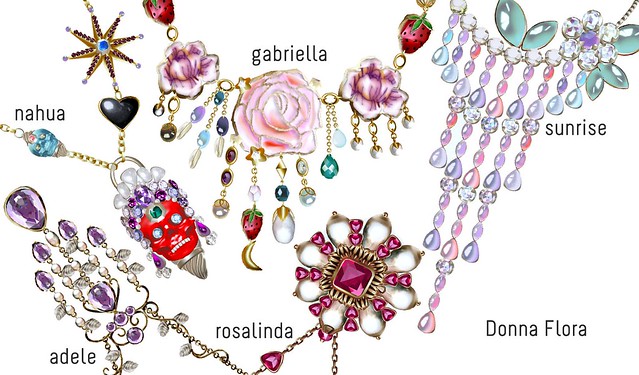
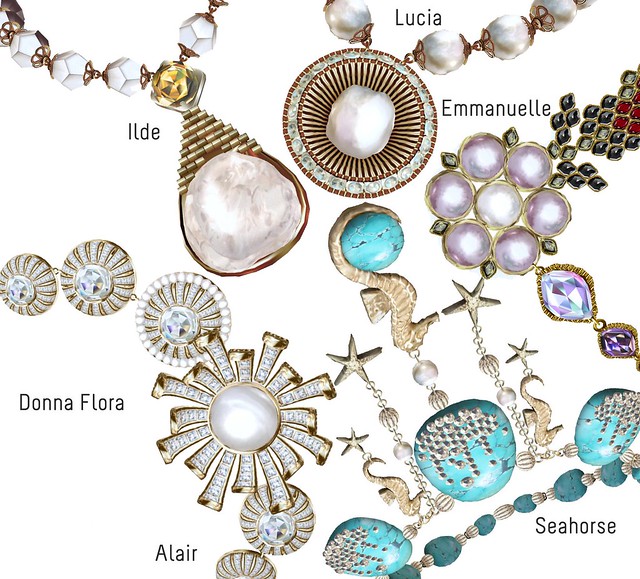
While sorting my inventory today, I realized that I have lots and lots of Donna Flora jewelry! I love this brand so much, and even though Donna Flora has clothes, hair, and shoes, my favorite items are the beautiful jewelry sets.
I’ve decided to sort through my huge pile and make a collage of 10 of my favorite Donna Flora necklaces. It was hard to pick just 10, cos there’s soooo many more that are equally beautiful.
I like Donna Flora cos every necklace is unique, and so realistic! Also, Valentine’s Day is next month, and I highly recommend Donna Flora if you’re looking for gifts for someone special. Everything is transferable 🙂
What about you? Where do you get your jewelry from? Make a collage of 10 jewelry pieces that you love from any single brand, or a mix of brands in SL! Blog about your favorite brand or make a collage, and submit it to the Blog Challenge group on Flickr. Be sure to share a link in the comments so I can check it out!
TY for posting this up. This is super helpful.
It bugs me to see that the mismatched colored attachments on avies (and even on certain blogs :s), though it’s no one’s fault really.
And yay for the fix! 🙂




This thing is so annoying, but HOORAY, a fix seems to be coming in version 1.22.
https://jira.secondlife.com/browse/VWR-8012
TY for posting this up. This is super helpful.
It bugs me to see that the mismatched colored attachments on avies (and even on certain blogs :s), though it’s no one’s fault really.
And yay for the fix! 🙂
In the new viewer and RC the bug is fixed. :))