This is How to make poses in Second Life, part 2! I will show you guys a super easy way to mirror poses in DAZ Studio (version 4.6). Big thanks to Melanie, who showed me how to do this last year!
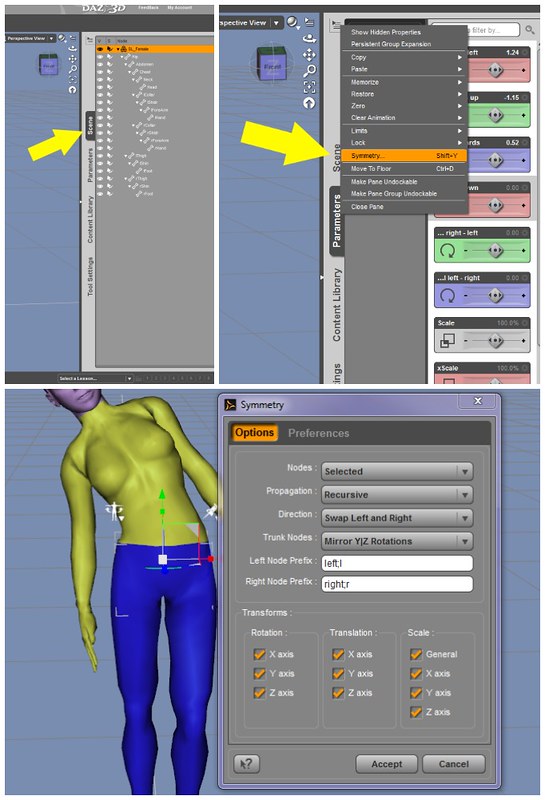
How to Mirror Poses in Daz Studio
1. Select the figure in the Scene Tab.
(You can also select the figure simply by clicking on the SL avatar in the main window. I usually click on the Pelvis to select.)
2. Click on the ‘Active Tab’ options button on the Parameters Tab. This button is in the upper right corner of the tab.
In the menu that appears, choose “Symmetry.”
In the Symmetry Dialogue Menu, choose the following settings:
Nodes: Selected
Propagation: Recursive
Direction: Swap Left and Right
Trunk Nodes: Mirror Y|Z Rotations
Left Node: left;l
Right Node: right;r
Transforms: Rotation: check x, y, z
Translation: Check x, y, z
Scale: Check all
3. Press ‘Accept’ on the bottom
Done!
Instructions modified from the How to do Mirror Symmetry DAZ3D tutorial to work for SL.
Read Part 1 – How to make poses in Second Life
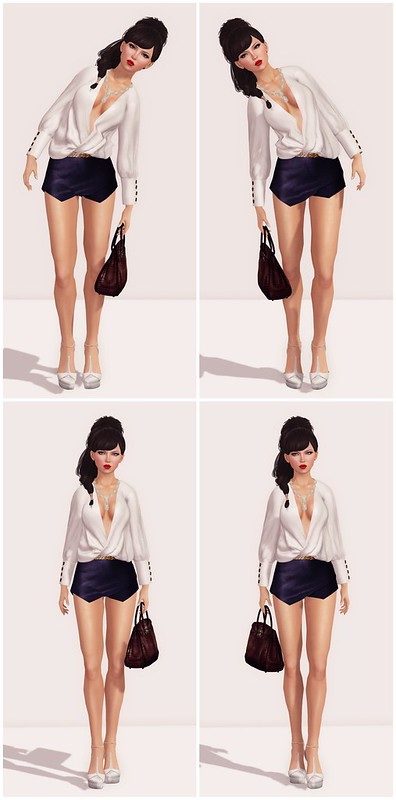
I made two poses and mirrored them for fun! Maybe some day I’ll package these tutorial poses and put them on MP!
What I’m Wearing:
Pink Fuel – Harley (Peach)
Truth Hair – Rocky
Ricielli – (S) Asymmetrical Shorts /purple
Ricielli – (S) Braided Belt
Ricielli – (S) Satin Top /white
Ricielli – The Birkin Bag (R HAND) /wine
Sax Sheperd Designs – Frills (Ione) Necklace (Hang)
ELEGANZA by Steffen Garcia (White)









Goodbye “SL’s largest community blog”, welcome “yet another aggregated feed among other aggregated feeds”. I am not exactly thrilled – the charm of iheartsl was the multi-author approach. What prompted this (at least for me) surprising change?
Oh Dear this is what I got, today when trying to post….or re=join or whatever…This blog has been archived or suspended for a violation of our Terms of Service.
You can create your own free blog on WordPress.com.