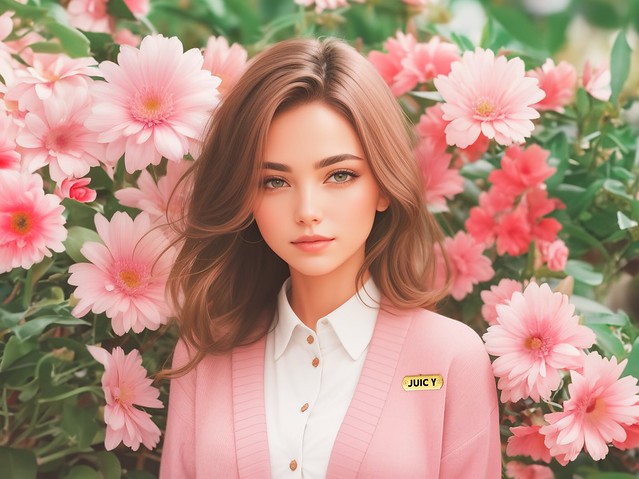
I’m just a Second Life resident. I’ve been blogging and playing this game, virtual world, whatever you’d like to call it, for decades. I grew up on this platform. I’ve taken thousands of snapshots over the years, raw, unedited, unfiltered. But I’m also the kind of person who leans into new tools, so of course I’m excited about using AI to enhance my photos.
Even when some designers push back loudly with “don’t feed my creations into AI or I’ll ban you from my store,” I can’t help but roll my eyes a little. They can’t ban the entire world. They can’t control what tools residents use in their own creative process. You can ignore the noise and keep using whatever tools you like. What feels insane to me is the hypocrisy. Big brands in Second Life, the ones making a living here, get a huge pass when it comes to AI editing in their ads. They’re showing AI hair, AI clothing, AI bodies, AI environments, all polished up to entice us to buy. That’s fine.
But when a resident retouches a photo with AI, the same residents who are actually spending money and keeping this world going, suddenly we’re untalented pariahs destroying creativity or causing water shortages or whatever the dramatic take is this week. The double standard is wild.
If you like this photo, yes, I edited it with ChatGPT Plus. I pay $20 a month for it. I also pay for Adobe Creative Cloud, Krea, and a bunch of other tools because I genuinely enjoy pressing buttons and seeing what happens. It’s still my photo. It’s still my avatar. I just gave it a glow up.
I am on various social media platforms for Second Life, and I have noticed that residents on Facebook absolutely love AI. They use it constantly to enhance their photos or make videos, and they share the results without hesitation. The same can’t really be said for platforms like Twitter, where a vocal minority is always ready to pounce and tell you that using AI wastes water and that you are a terrible human for even thinking about it.
So anyway, I was casually browsing Facebook when I stumbled across a very amusing trend. Second Life avatars being put in jail for the crime of using AI. The prompt was created and shared by a resident named Danny Fróes (idjdanny). I believe it was originally written in Portuguese, but Facebook translated it to English for me.
Copy this prompt into ChatGPT (or any AI image generation site) with a reference photo:
Using the provided image as a face reference, create a close-up, photorealistic 8K HDR portrait of this woman, portrayed in a classic mugshot. The crime and the mugshot should correspond to the aesthetics and personality you perceive in the picture provided. The woman has voluminous, wild, messy hair. Your makeup complements your personality and aesthetic. The woman is looking straight at the camera in a confident, rebellious, challenging or fun pose. The mugshot should include your name and the crime she committed. Your name is: [Your Name]. Crime Using AI in Second life 01/05/2026 Do not alter your face or your deeds.
You can use Google Gemini, ChatGPT, Grok, and others to get some pretty amusing results. Some services produce more realistic images than others, but I preferred ChatGPT for photos because it did a great job of keeping the final image looking similar to my avatar’s reference photo.
Try the prompt and show me how your photo turned out!
If you’re not on X (Twitter), you really should be. I use a few different platforms to keep up with Second Life news, but lately I’ve been enjoying X more because it gives me a nice mix of real world updates too. The algorithm is surprisingly good at surfacing tech content I care about, like the latest in AI. Today I came across a fun tweet that inspired me to try something new. I turned my Second Life avatar into a figurine.
All you have to do is go to Google Gemini and enter this prompt:
Create a 1/7 scale commercialized figurine of the characters in the picture, in a realistic style, in a real environment. The figurine is placed on a computer desk. The figurine has a round transparent acrylic base, with no text on the base. The content on the computer screen is a 3D modeling process of this figurine. Next to the computer screen is a toy packaging box, designed in a style reminiscent of high-quality collectible figures, printed with original artwork. The packaging features two-dimensional flat illustrations.
From photo to figurine style in just one prompt.
People are having fun turning their photos into images of custom miniature figures, thanks to nano-banana in Gemini. Try a pic of yourself, a cool nature shot, a family photo, or a shot of your pup.
For my Gemini photo, it took a few tries with Second Life snapshots before the app accepted one. Eventually I uploaded a full body shot and within seconds it generated the cutest figurine photo. I even tweaked the prompt to add some flowers to my desk. To get good results, you’ll want a clear picture of your avatar against a plain background. I was impressed that it captured my clothing and accessories so well and it really does look like Gogo in SL.
Try this and let me know what you think! Don’t you want a doll of your Second Life avatar? I know I do!
It’s the second day of Blackout August and since I’m not shopping, I decided to revisit enhancing Second Life photos with Krea.ai. Lately, vendor ads in SL are full of unrealistic hair, faces, and clothing that don’t actually exist in-world. I don’t know what tools other people are using, but out of everything I’ve tried, Krea.ai has been one of the easiest and probably the most beginner-friendly.
Like most AI tools, the free version of Krea has some limitations. You won’t get full customization or the highest quality images unless you upgrade, but I’m using the free version for this.
To enhance your SL photo, make sure you use the Enhancer tool. If you use the Image tool, it tends to change things too much and doesn’t look like your original. Once I upload my photo into the Enhancer, I can adjust the sliders on the right to tweak the AI strength, resemblance, clarity, and more. The paid version gives you more range, but the free version is still workable.
Personally, I don’t love the full Krea output on its own, so I save the enhanced image and overlay it with my original SL photo in Photoshop. Then I blend them together. Sometimes I just blend the hair, or just the face, or whatever needs a boost. My final result looks really polished and still about 80 percent true to Second Life.
One note of caution—some brands will ban you for using AI editing in your photos. I think it’s a tool like any other, but use it with intention.
Let me know in the comments if you’ve been playing with AI editing and which apps are your go-to.
I came across this trend that’s going viral right now with Second Life residents, where you take an SL photo and drop it into ChatGPT with a prompt to generate a realistic image. It’s fun, it’s cute. I saw my friends doing it, so of course I had to try too.
Here’s how you can create your own SL to AI Selfie! Use this AI prompt and upload a photo of your avatar to go with it. You can edit it however you like, add details, change the time of day, whatever you want.
Create an image that looks like a selfie taken with an iPhone. There should be no clear subject or specific composition, just a casual, unintentional snapshot. The image should be clear and lit evenly by daytime. The aspect ratio should be 9:16. It must not look AI-generated, but rather like it was taken by a real person.
While I was doing this, I had a moment where I wondered if any creator reading my blog is going to ban me for running my photo through ChatGPT and then I immediately decided I don’t care if people are going to be witch hunty about it.
Remember that blog post I wrote a while ago about some creators banning customers for using AI editing tools? Yeah, still relevant. Check profiles before you shop, because you don’t want to support anyone who’s going to turn around and blacklist you.
I’m screaming at how cute this new Penelo skin from Glam Affair is. I did fix a couple things on the face with Izzie’s tattoos, mostly the pinkish circles around the eyes, but overall it’s such a pretty skin. My favorite thing is definitely the lips and the lipstick, it’s the best I’ve seen on a skin in a long time.
Recently, I came across a tweet about a photo taken at a Second Life event. The photographer had used AI to enhance the image, and the creator of the build featured in the photo was upset. That moment sparked a deeper question for me about how AI is affecting our community, both in Second Life and in the real world.
As a journalist and the owner of one of Second Life’s longest-running feeds, I believe this is an issue worth exploring. AI is no longer a futuristic concept; it’s here, shaping our virtual and creative spaces right now. So, I did what any curious person might: I asked a question.
I tweeted to Philip Rosedale, tagging him in a repost of the original tweet by the designer, and asked for his thoughts on designers banning paying customers from their stores simply for using AI to edit photos featuring their products.
Let’s be clear. This was a paying customer, not a sponsored blogger who received the item for free in exchange for promotional content.
I also asked the designer a few respectful follow-up questions to better understand the situation:
Was the anti-AI policy made clear before the purchase?
Was the person in question a store blogger or an event blogger?
Rather than engage in dialogue, the response was swift and hostile. The store owner became aggressive, and what followed was an organized harassment campaign: blocking, banning, public call-outs, and social media attacks from the designer and her circle. All of this over a question and a public repost.
Now, let’s talk about rights.
As a store owner, you absolutely have the right to decide who shops at your store. But does that extend to controlling how your customers use the items they’ve purchased, especially when they’re not violating any of Linden Lab’s platform rules?
Think about it: if you buy a designer dress in real life and enhance a photo of yourself in it using AI tools, can that designer dictate what tools you use? Should they?
That’s the heart of the issue.
We’re at a turning point. AI is a powerful tool, and it’s not going away. We need to find ways to integrate it thoughtfully and responsibly. Yes, AI raises valid concerns. Artists have every right to protect their work. But the real conflict is with the AI platforms and usage terms, not individual customers using generative tools for fun or creative expression.
What happened to open discussion?
Instead of resorting to harassment and public bans, we need honest conversations about how AI fits into our world. Shutting down discourse through bullying only creates more tension and alienates those who genuinely want to engage.
Second Life has always prided itself on freedom and creativity. Its slogan says it best: Your world, your imagination. That imagination now includes AI for many users, especially those who’ve found new joy and creative flow through it. If that’s discouraged or punished, we risk losing more of the vibrant community that keeps SL alive.
Let’s talk about it:
Should a customer be banned for using AI on a photo featuring a purchased item?
Should designers disclose AI-related policies before selling items?
What are reasonable boundaries for creators who don’t want their products used with AI?
These are real, evolving questions, and the answers deserve more than a block button.
I’ve included screenshots and a timeline below of the events that unfolded. At no point did I attack or harass anyone. I simply asked questions and engaged with the issue thoughtfully.
I understand people want to support their friends, but inflating a single tweet into a campaign of harassment doesn’t help anyone. If anything, it shows just how badly we need open conversations around these new challenges.
Because one thing is clear: if people aren’t allowed to express themselves or explore creatively, they won’t need to be banned. They’ll just log out and may not come back.
Image created with Stable Diffusion + Adobe Generative Fill
Adobe’s new Generative Fill feature in Photoshop (beta) is a game changer! You need to Google it right now and be amazed at all of the creative uses. I’ve been playing around with it all week by adding accessories to my Second Life avatar, changing the background in my photos, and expanding missing portions of a cropped image. The best thing about Adobe Generative Fill is that you can leave it blank and let AI figure out how to fill in the missing pixels.