Gogo’s Tutorials

  • | |

    Freckles

    Freckles

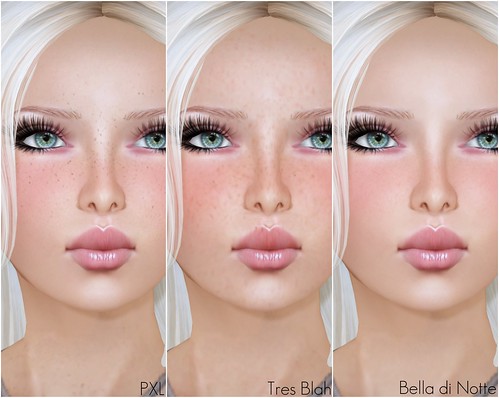
    Let’s talk freckles! I’m not a huge fan of wearing lots of freckles in SL, but I do have quite a few in my inventory. I thought I would show you guys a lil’ bit of what’s available, if you like to wear freckles on your skin. Many skin designers have freckles drawn on the skin itself (or they include a freckles layer) — if your favorite skin doesn’t come with freckles, or too little/too much, you can wear as many of these freckles layers as you want to create a new mix.

    Freckles

    What I’m Wearing:

    1. Clean face (No Freckles)
    2. chelle – Freckles Light
    3. Tuli – Freckles Light
    4. PXL – FullBody Freckles
    5. Tres Blah – Freckles
    6. Bella Di Notte – Freckles so subtle!

    Some of these freckles tattoos are sold as part of a skin package, or as individual tattoo layers.

    Where are your favorite places to get tattoo freckles?

  • | |

    Depth of Field

    Truth Hair

    Truth – Lucia (color-changeable hair band) | Teshan

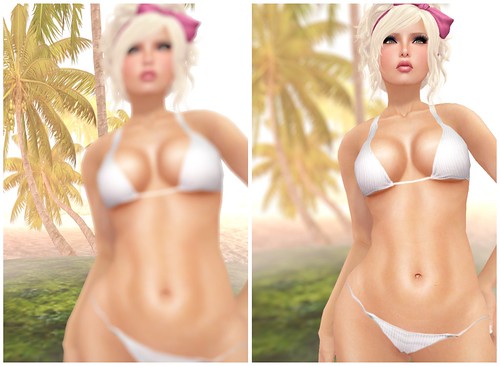
    Hello SL! I downloaded the latest SL Mesh Dev Viewer just to use the depth of field feature that was available a few months ago. Right away, I noticed that they have added a radio button to toggle DoF on/off, so that’s awesome. I looooooove DoF, but for some reason ALL SL viewers have been crashing me tons lately, ughhh. I had to shoot these images smaller resolutions (about 1100 x 1000px) to avoid the dreaded “line” going through my images, but as you can see, DoF is pretty amazing.

    *Important tip: If you install the Mesh Dev Viewer, be sure to select the correct grid before logging in. Ctrl+Shift+G (to bring up the Grid Selections) and you want to select AGNI (main grid) and not any of the other beta grids.

    DoF

    (Raw shots from SL – focusing background and foreground, very easy!)

    People who are good with Photoshop can do these effects on their own, but if you’re totally lazy like me, the built-in DoF feature is the perfect choice. I am crossing my fingers that this will be released on the official client soon. At this point, I would even trade Avatar Physics for DoF, as I think it will be more useful to me, for fashion photography.

    Ohhhhhh, and check out new Truth hair! So adorable this week; perfectly girlie, just the way I like it.

    What I’m Wearing:

    Laqroki – Linnea (Fair) Light Brows – 03
    BOOM – Infinity Pin Stripe Bikini (White)

  • |

    Avatar Physics!


    The latest Second Life Development Viewer has avatar physics enabled!! Hamlet blogged about it on NWN, and there’s even a video tutorial if you guys want to check it out.

    I had so much fun playing with the new avatar physics, I even made a lil’ video and threw it on YouTube. I haven’t done that in almost two years, so my video didn’t turn out quite as nice as I had hoped, but I hope you guys can see clearly how natural and amazing and FUN this will be for SL residents. Even if you don’t want extreme bounce, this new physics layer have sliders for you to control as much or as little bounce as you want.

    If you want a copy of my physics layer, it is available for FREE on Marketplace or at my shop in SL.

    You can follow the tutorial on NWN to create your own physics layer, or grab a copy of mine and just wear. Be sure to use the latest SL Dev Viewer, or a compatible Third Party Viewer (TPV).

    Second Life’s Knowledge Base also has a step-by-step tutorial on Enhanced Avatar Physics that includes pictures!

    UPDATE April 14th, 2011: If you purchased my Juicy Physics package before 9PMSLT today, there is an error in the Breasts Bounce: Max Effect setting. It should *not* be set to 0! For a lil bounce, set it to 25 and for max bounce, set it to 65 or higher.

    I just replaced it with an updated package on Marketplace.

    Also, Second Life has added Avatar Physics to the latest Second Life Beta Viewer (Second Life 2.6.3 (225685)) too! It is no longer limited to just the Development viewer.

    note: For some reason, SL has been resetting the Breast Bounce > Max Effect setting! For a lil bounce, set it to 25 and for max bounce, set it to 65 or higher.

  • |

    Starlight skins for Second Life 2.0 Viewer

    starlight skin for SL

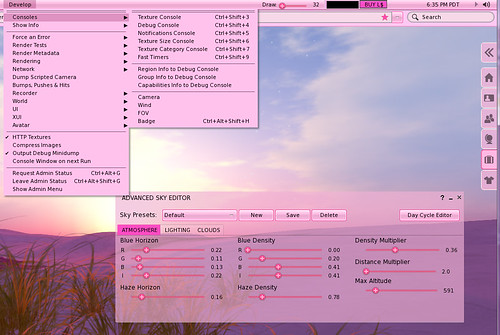
    Do you dislike the default Gray SL 2.0 viewer colors? I’ve always thought it was too dark, but I didn’t want to use a Third Party Viewer to have different skins.

    My friend Melanie showed me these Starlight Skins awhile ago, and finally I tried it today to get the awesome Silver Pink skins and it’s so awesome!! I looooove my SL viewer now.

    I’m using Second Life Viewer 2.5.2 (2.5.2.223426) & add-on StarLight 2.5.3 skins.

    Follow the instructions on this website to install it, it’s super easy.

    The Starlight skin is not just pretty, it also adds some useful changes to the default viewer. My favorite is the new “Pops up sky editor window” button and also draw distance slider.

  • |

    Katey Coppola’s Tutorials

    Glowy

    I’m HORRIBLE at following Photoshop tutorials, cos I usually get lost when I can’t find a tool or understand how to use that tool (which is often the case).

    I followed one of Katey Coppola’s new tutorial videos on Youtube and made the pretty glowy background for the image above. I got lost at 0:30 cos I couldn’t find the brush, and I have no idea what it’s called (I blame her British accent! LOL JK).

    Katey’s tutorials are very helpful, even a newb like me managed to get through most of the steps! If you’re bored and want to learn something new, check them out.


  • | |

    Hair base hairstyles

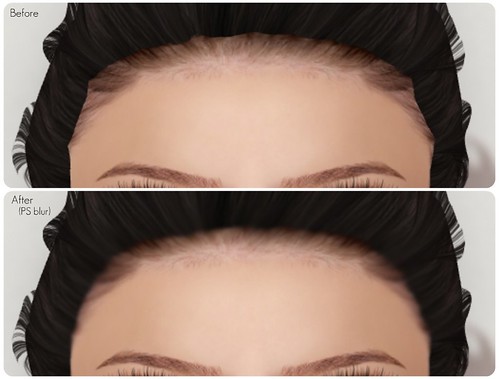
    I’ve been avoiding ‘hair base hairstyles’ far too long, and I want to embrace them this year. Some hairstyles needs hair base to even out the hairline, but my hair color of choice (light Blonde) never matches any hair base in SL. I’m still waiting for my favorite hair brands to release their own matching hair bases.

    Hair base hairstyles

    I have a question for all the hair base lovers and PS experts out there! When you find a hairstyle with similar/matching hair color as the hair base, is the hairline suppose to be smooth or is it still jagged? My Before picture is what it looks like to me in SL, and to me, that’s not wearable. I blurred the hairline in PS, but I’m not happy with it (I’m a PS editing newb).

    What are some of your favorite hair base hairstyles? Who has matching hair bases for their hair? Am I just wearing it wrong? Help me SL!

  • | |

    Layer up

    hello

    5 tattoo layers is not enough! I thought five was plenty when this first came out, but sadly, I’ve already used all 5 on my face and I probably could add more if there were more slots available.

    My base skin is the LeLutka Natasha (Hush) Makeup4 — then I added:

    cheLLe – (blush) Everyday Blush 3
    Curio – GP Petal (Light) Ice Queen – Lips 1
    Bella di Notte – Freckles Tattoo Layer
    cheLLe – (mole) Mole! 2 *right eye*
    Mozz – Aegyo (Teeth) Light skintones

    This is the order that they’re worn in; the freckles shows better if worn over the blush and teeth layer should go on top of lipgloss (lipstick) layer.

  • |

    Depth of Field

    Depth of Field test shot on Juicy

    A couple of days ago, I was playing around with the new Depth of Field feature available in the Project Viewer: Mesh (beta) and I really really really love it. It is automatically enabled if you download the right client – I followed Melanie’s Depth of Field tutorial, so check it out if you want to play around with DoF. This tutorial is for SL viewers not TPVs (Third Party Viewers); I always prefer to use the SL clients whenever possible cos more people use it.

    Depth of Field test shot on Juicy

    These pics are kinda fuzzy cos I forgot to turn my image quality slider to high (oops!) – but you can see the background is blurred, that’s all from SL with no Photoshopping. I looove shiny new features to play with, thank you Lindens!

  • | |

    How to wear multiple tattoo layers

    I get this question a lot so I thought I would make a quick tutorial. Wearing multiple tattoos is really simple, but you’ll have to use a viewer that has this feature enabled. I am using the latest SL 2.30 Beta viewer, so the tutorial is for this viewer only and not older viewers or any other Third Party viewer.

    How to wear multiple tattoo layers:

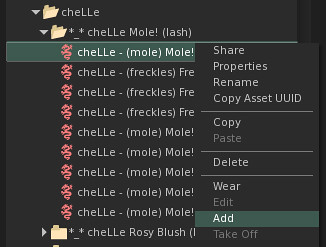
    • Go to your inventory and select the tattoo layer that you want to wear and right click -> ADD

    How to wear multiple=

    • Do this for any tattoo layer that you want to add-on (up to 5 times) and you will be able to wear multiple tattoo layers

    That’s it! 🙂

    How to wear multiple=

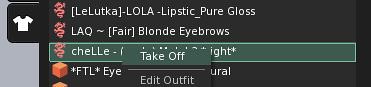
    When you click the little SHIRT (My Appearance) icon, and go to Wearing tab, you should see all the tattoo layers you’re wearing listed there, and right click “take off” to remove any layer.

    Helpful tip: Tattoo layers are shown in the order that they’re worn. For example, I typically wear Eyeshadow -> then eyeliner -> then lashes. If you do it the other way around, lashes may be hidden under the eyeshadow layer and it won’t look as nice. If something doesn’t show up as well, just remove it and wear it again so it sits on top the other layers.

  • | |

    Cheap Makeup

    Cheap Makeup

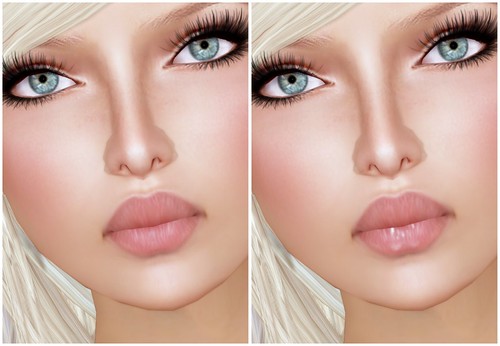
    Left: without lipgloss | Right: with Cheap Makeup “Miss Priss Lipgloss” tattoo

    When I tell you I go a lil nuts for tattoo layer makeup, I’m not kidding! I’m actually wearing all 5 tattoo layers here and it’s all on my face. I’m wearing 1. hide system lashes tattoo 2. tattoo lashes & liner 3. tattoo lipstick 4. tattoo lipgloss and 5. tattoo brows. I could probably wear more if I wanted freckles or blush or eyeshadow! But it really does get complicated once you wear too many at once, cos layering them in order is crucial.

    Picnik collage

    Cheap Makeup – all 6 tattoo layers in the Miss Priss Lipgloss pack

    Cheap Makeup has a new pack of Miss Priss lipgloss out that includes two versions (small and large) so it should fit a lot of skins in SL. I’m just so happy that out of 6, 5 of them work pretty well with this skin. I’m wearing the lipgloss tattoo layer over a light matted lipstick because um, you probably wouldn’t wear these on lipsticks that already have lots of lipgloss already.
    Cheap Makeup

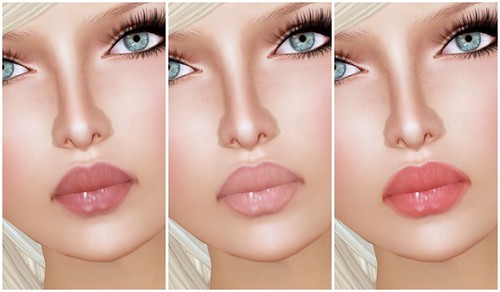
    Cheap Makeup – perfect fit (small size) | too small (small size) | too large (large size)

    As you can see, the darker lipgloss tint works better on my skin even though it’s the same size as the lightest tint; the lighest one didn’t blend well (causing a lip liner effect). If it’s too small or too big, it will look off! I guess there’s no “magic” combination, just try ’em on with your favorite skin and see if they work well together.

    Cheap Makeup

    This is a close-up! The lip liner effect isn’t too bad but too-big lipgloss is not a good look.
    Cheap Makeup

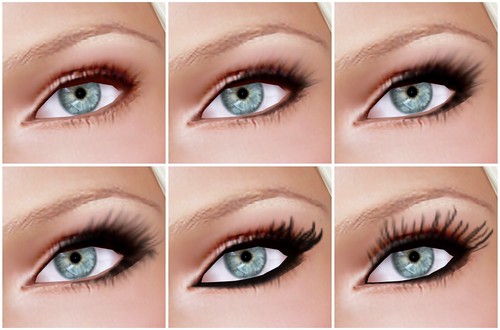
    Cheap Makeup – tattoo lashes (a gatcha gatcha item)
    Left to right: default skin & the rest are with tattoo lashes

    Cheap Makeup is the place to go for tattoo lashes. I’m always wear one of these under my prim lashes to create a more lush effect.

    How much do I love tattoo layers? TOOO MUUUCHHH!  These are some of the layers I wear to create a totally unique look for myself, cos everything is available in unlimited supply in SL. If you play around with tattoo layers, it’s possible to create a semi-custom skin and not look like a total *ahem* clone.

    Visit Cheap Makeup!