I’m doing this tutorial to help anyone that wants to learn how to make poses in Second Life. I am using DAZ Studio, but you can use QAvimator, Poser, and a few other programs too. There are tutorials out there for those already, so I’ll just focus on DAZ.
Download and Install:
DAZ Studio 4.5 (free)
Second Life avatar meshes in .obj and .cr2 format
To make poses for Second Life, you have to use the SL .obj and .cr2 avatar files, not the default DAZ avatar. This is the most important step in the pose-making process for DAZ, but it’s similar in other programs too. In some cases, you can export your own shape to use, but I couldn’t get it to work right in DAZ so we’ll skip that for now.
1. Importing the Second Life .obj and .cr2 files into DAZ

File -> New (to clear your scene) then,
File -> Import

Select SL_Female.cr2, then Open it in DAZ
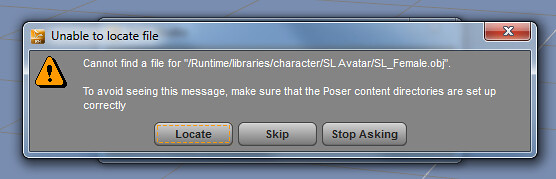
Locate the SL_Female.obj file, then Open it in DAZ
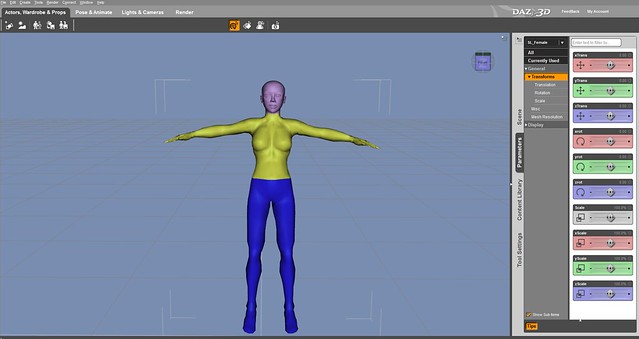
Your screen should now look something like this, with the default SL avatar shown on the screen.
Now you’re ready to start making poses for Second Life!
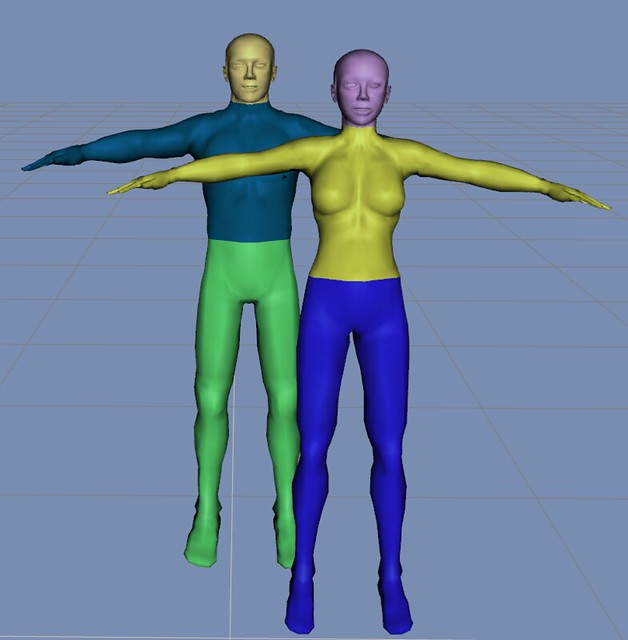
If you’re making group or couple poses and need to import more avatars, just repeat Step 1.
2. Posing your avatar in DAZ
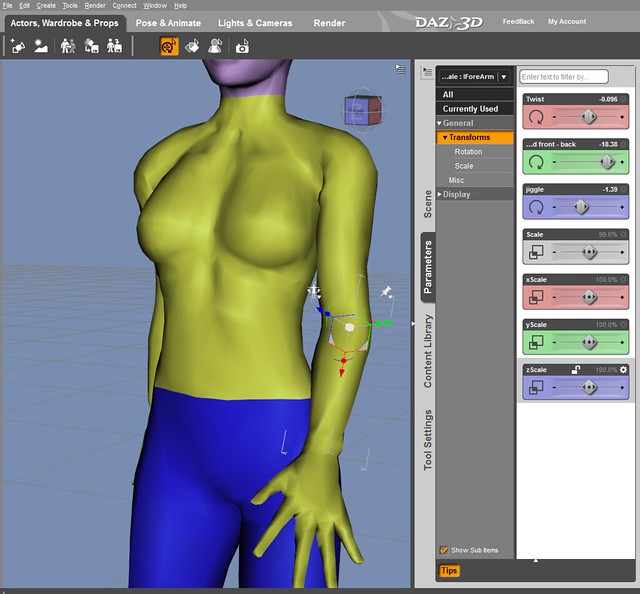
What I love about DAZ, is that it’s free and easy to use. You can select a body part and use your mouse to move it around and pose it, or use the Parameters tab, and control each joint with the sliders. If you mess up a joint, just type CTRL+Z, to undo.
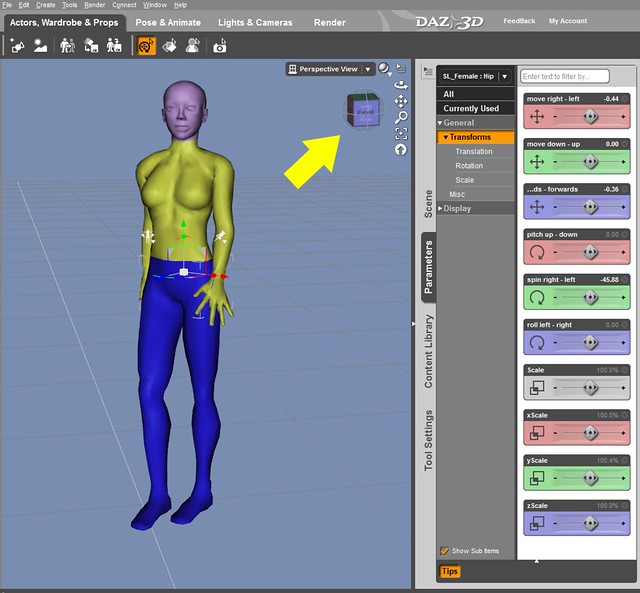
Rotate that 3D box icon move your avatar around, or use the View Tools to change the view on your screen or zoom into specific areas.

My final step, is to always check to make sure my feet are parallel to the ground, especially when I’m making standing poses. I don’t like it when my feet sinks into the SL floor… so be sure to check that!
If you’re happy with your pose, then export the .bvh file from DAZ into your computer.
3. Exporting your .bvh (pose/animation) file
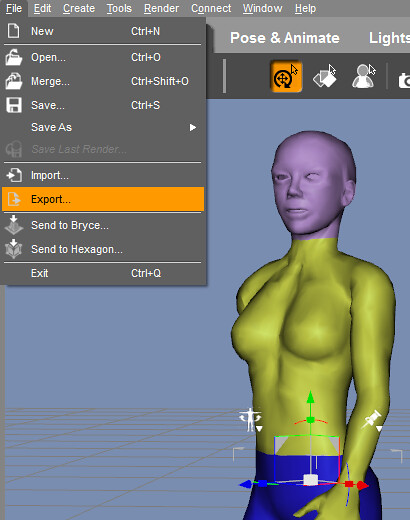
File -> Export then name your file, and the next screen should pop up:
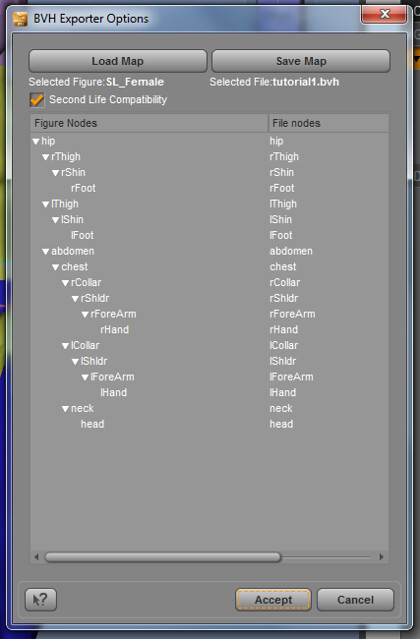
Be sure to have “Second Life Compatibility” checked, then click Accept to export.
I named mine tutorial1.bvh, now it’s time to Upload your new pose file into SL!
4. Uploading your .bvh (pose/animation) file into Second Life
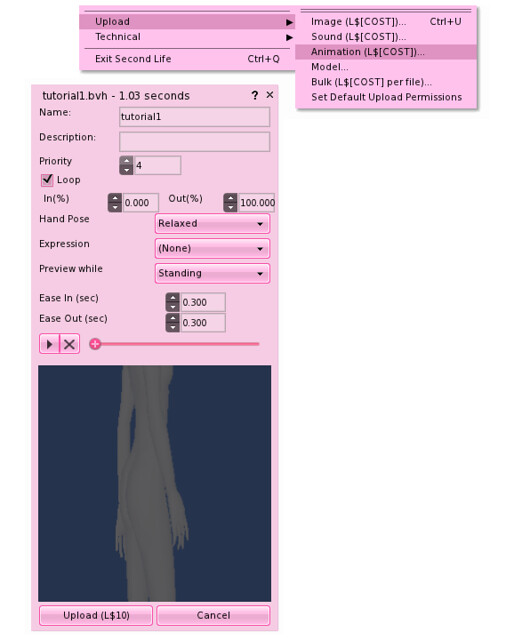
Me -> Upload -> Animation (the cost is $10L)
To save some money, you can test your pose on the Beta Grid, or use a Third Party Viewer with temporary uploads or previews.
Change your priority to 4. I use 4 for standing poses, cos it will lock all of your joints to make sure they don’t move randomly. For AO poses, I use priority 2.
Check Loop, this keeps the avatar posed otherwise it stops after a few seconds.
Choose Hand Pose, Facial Expression, Preview while Standing/or Sitting.
You can change Ease in/Ease out, but I usually keep it default at 0.300.
If everything looks correct, upload your shiny new pose into SL! 🙂

This is what my pose looks like in SL. Basic standing poses are simple to make, and probably the easiest to start with. I made this pose while writing the tutorial, so it’s not too complex, and only took a couple of minutes. As your pose gets more complex, it will take more time to them, so that’s why I prefer to buy most of my poses.
If you follow my tutorial, leave a comment and let me know if it’s helpful to you. This is not the only way to make poses for SL (and probably not the best), but it an easy to follow tutorial to get you started.
I’ll follow-up this tutorial with part II, which will include:
- How to mirror poses
- How to make couple poses
- Scripting your pose in SL
- and include any other questions you have
Happy pose making!
Read Part 2 – How to make poses in Second Life, part 2 / mirror









Thank you for this! I often stumble across poses on the fly that I’d like to use right away, and I find QVanimator lacking a bit, but thanks for the tut and for shining a light on a new program for me. MUCH appreciated!
How do I make toddleedoo poses?
LOVE that the program you chose is for Macs and PC’s!!! YAY
Thanks so much for this! I always wanted to try making my own poses, but it always seemed like a huge step from point a to point g.
Thank you so much for this!
Wondefull tip.
I still using this ugly qavimator but i will try to use your program.
Btw.
Is anybody know how I can use a Kinnect to create animation?
Or is that not possible yet?
Thanks, Gogo! I never really knew what the process was. 🙂
Thanks, this is very useful and easy to understand!
Grazie
Great tutorial, but I am more interested in knowing where you got that adorable outfit l0l
Ok! coming up next 🙂
yay u rawk!
Perhaps some tips and suggestions on adjusting group/couple poses to match avatars heights? <3
( Did that make sense? XD )
Thanks so very much for this tutorial. No idea that poses could be made so easily.
I’m so excited to try this, thanks so much Gogo! <3
Trying my hand at DAZ and while its amazing to make poses and even upload them, I’m having an issue when it comes to editing/reuploading…. they end up jumping around when looping and when I reopen it in DAZ, it doesn’t look anything how I saved it :
I am having same issue. Does not look like anything the way I saved it
Thank you so much for this, I have been trying to make poses for months using Daz and couldn’t get it to work, the poses were fine but wouldn’t upload. Thanks to your tutorial I found that I was actually doing things correctly, but there must have been a viewer glitch! Because of that glitch, which I just thought was me doing something wrong, things got way more complicated than they needed to be as I tried various different programs. I was so close to buying Poser and then I saw your tutorial, tried Daz again and it worked! So thanks for sharing your knowledge and for saving me rather a lot of money! I can’t wait to see the next tutorial! 🙂
Great post, thank you so much, this is very useful.
Just tried this tutorial and YAY! It’s fun! Looking forward to your next pose tutorial.
For some reason the link doesnt take me to a download page, it says that the page cannot be found.
ty
!!!
i just looove it when people share their tips and knowledge!
I ABSOLUTELY wouldn’t have figured this out without your tutorial.
Respect.
You’re welcome 🙂
Thank you so much for telling us about Daz it is easy and that’s what I love. I just have to figure out how to “crouch” the avatar now 🙂
for some reason when i import the avatar it is one piece and i cant select the different joints to pose them.. any idea what im doing wrong LOL totally new at this.
you have to make sure when you import to select the CR2 file first THEN when the box pops up you press the locate button and then select the OBJ file
Great tutorial! I was looking for something easier than qavimator and this looks awesome. Thank you.
Love this! Thanks so much, is it possible for you to do a tutorial showing us how to make poses with objects? Thanks!
Hii! I know this is a little bit of an older post, so I was just wondering if this still works? I tried using DAZ to make a pose with the SL female avatar, and her body seemed to be locked! I couldn’t edit the position of anything on her body, and when I tried to click on a hand or a leg to try to customize it, it would select the whole body. Is this a common mistake, or is there something that I’m missing?
Thanks for the tip 🙂
This was awesome, I’ve been trying to figure out how to export my poses from Daz forever! Thank you!
Thanks for this article – immidiately should try it. And it works simple and easy to use, also because of your excellent introduction. The one big advance i see compared to Qavimator as I used sme years ago – maybe that has changed – but in Daz it is easy to upload your own .DAE objects, that means you can adjust the pose to the actually Chair, bed or whatever. And of course that you can have multiple avatars up. So Thumbs Up Juicy Bomb great job and good solid tutorial.
PS. remember to adjust the linked avatar from SL. The gentleman is he about 1,80 meteres? Nowadays they are 2,30 or more in SL. What i did in Daz, I made a “simple object” as you can se in menu – the set the size to 2.30M and adjusted the avatar in high acordingly.
It refuses to see the CR2 file only the obj which of course i cannot manipulate. I’m at a loss how to do this.
If you import the .cr2 it won’t save as a character preset, and I’m not sure what is required to do so but the error I get is “You must select a TriAx Weight Mapped figure in the scene to save a Character Preset”.
If you put the .cr2 file into a Characters directory then it’ll show up in Content Library and Smart Content panes. You could use the default Runtime\ (C:\Users\Public\Documents\My DAZ 3D Library\Runtime\Libraries) for it, and that would save you the trouble of making your own Runtime\, because DAZ doesn’t build the whole directory structure for you. If you already have a Poser Runtime\, that can be added easily.
Very helpful! Thank you …
I don’t see the SL_female file anywhere when i click import, I have it on my computer but it doesn’t appear when I search it, what am I doing wrong?
Nevermind I had to extract XD I’m silly I know.
Does anyone know if there are .cr2 and .obj files for SL avis including the new Bento bones? The Bento ressources only provide models and skeleton files for Collada, Maya and FBX – which I don’t have / know 🙁 Maybe there is a way to convert those to DAZ 3D inputs?
Spent days looking for a certain pose, only to find some “close” to what I wanted, but didn’t quite measure up. Only one thing to do: MAKE IT MYSELF.
Stumbled onto this page and gogo broke it down nice.
D/L’ed the DAZ program and after a few tries, figured how to work them and made the pose I wanted. Sadly, this DAZ doesn’t involve Bento fingers. I suppose in time, I’ll be making another pose.